arduino-lcd-connection

Arduino Display Data using IIC LCD Module

How to setup 16x2 lcd on Arduino? Its not big issue ,read full blog and watch video at the end of content. It is hard to display data using serial monitor. So if you want to display data of Arduino or given text to 16x2 Char LCD .This tutorial will help you. Required component  :Arduino Uno Board x 1 IIC LCD /I2C LCD .   or   I2C Display Module + 16x2 Char LCD    x 1 M to F Jumper Wire  x...

Featured Read more...
motion sensor tutorial

Arduino PIR Motion Sensor Tutorial

PIR modules have a 3-pin connection at the side or bottom. The pinout may vary between modules so triple-check the pinout! It's often silkscreened on right next to the connection (at least, ours is!) One pin will be ground, another will be signal and the final one will be power. Power is usually 3-5VDC input. When object comes in detecting area it will return 1 from output pin otherwise it return 0. The IR sensor itself is housed in a hermetically sealed metal can to improve...

Featured Read more...

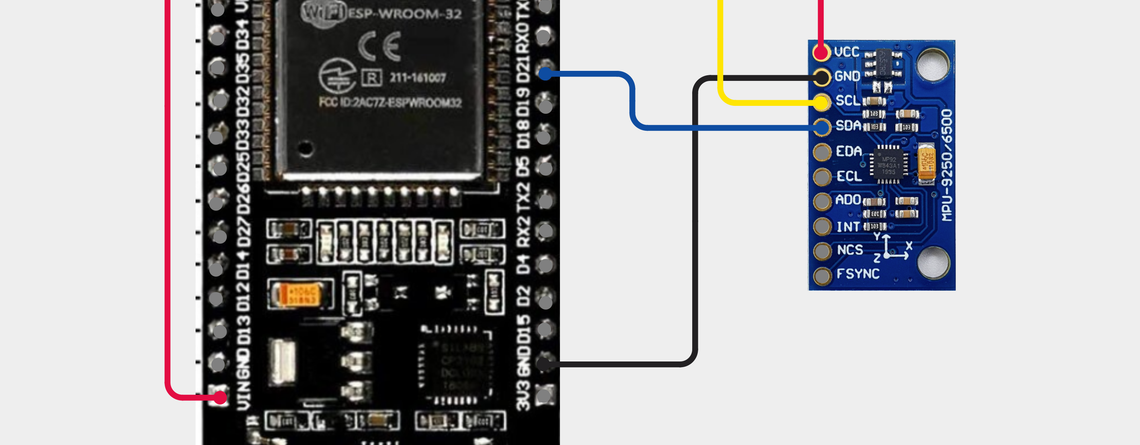
MPU9250 with ESP32: Complete Guide to Accelerometer, Gyroscope and Magnetometer

The MPU9250 is a powerful 9-axis motion sensor that combines a 3-axis accelerometer, 3-axis gyroscope, and 3-axis magnetometer in a single compact module. It is widely used in robotics, drones, IoT devices, navigation systems, motion tracking, balancing robots, wearable electronics, and embedded systems.In this tutorial, we will learn how to interface MPU9250 with ESP32 using I2C, read accelerometer, gyroscope, and magnetometer data, understand the MPU9250 registers, and write a complete Arduino IDE program.This guide is suitable for beginners as well...

Read more...