

16Dec
ESP-NOW with ESP32
📌 What is ESP-NOW?
ESP-NOW is a wireless communication protocol developed by Espressif, allowing ESP32 boards to send and receive data directly without Wi-Fi or internet.
🧠 Key Features
- 📡 Peer-to-peer communication (up to 20 devices)
- ⚡ Low power and fast (few milliseconds delay)
- 🔐 Encrypted data transmission
- 🚫 No Wi-Fi router or internet needed
- 🔁 Bi-directional communication supported
🔌 Where to Use (Use Cases)
- 🎮 Wireless joystick controller
- 🏠 Smart home automation
- 🚨 Personal safety devices (like Safeguard+)
- 🌱 Remote environment sensors
- 🚗 Vehicle-to-vehicle communication
- 🎓 College projects requiring mesh or local network
🛠️ Components Needed
- ✅ 2x ESP32 Boards
- ✅ Micro USB cables
- ✅ Arduino IDE installed
- ✅ Sensor/input (e.g., joystick/keypad)
- ✅ Output (e.g., LED, buzzer, OLED)
📍 How ESP-NOW Works
- ESP32 uses its WiFi in STA mode (no router)
- One board becomes sender, other is receiver
- Data is sent in small packets (struct format)
- Boards communicate using each other’s MAC address
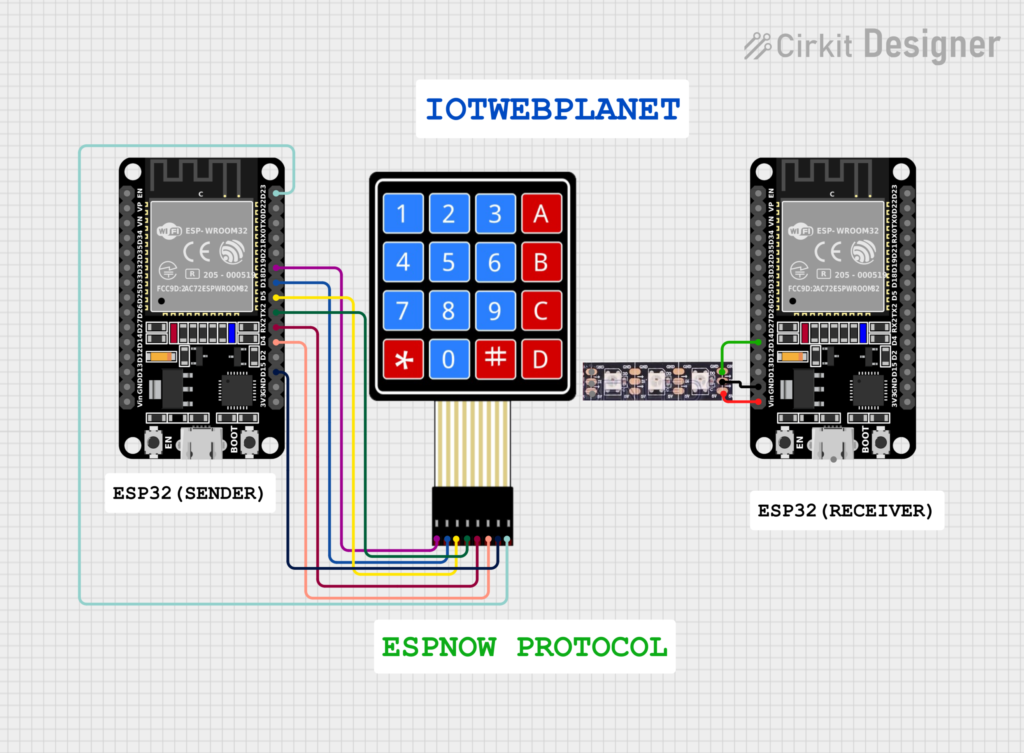
⚙️ Pinout (Example for Sender – 4×4 Keypad)
| Keypad Pin | ESP32 Pin |
|---|---|
| R1 | GPIO 19 |
| R2 | GPIO 18 |
| R3 | GPIO 5 |
| R4 | GPIO 17 |
| C1 | GPIO 16 |
| C2 | GPIO 4 |
| C3 | GPIO 22 |
| C4 | GPIO 15 |
⚙️ Pinout (Example RECEIVER)
| Neopixel Pin | ESP32 Pin |
|---|---|
| VCC | VCC |
| GNG | GND |
| DOUT | GPIO15 |
🧪 Applications
- 🔘 Wireless button panel
- 📦 Inventory scan/tag systems
- 🔋 Battery-operated remote devices
- 🔐 Secure, private IoT devices (no cloud dependency)
- 🎓 Ideal for IEEE & hackathon projects
💡 Code Overview
Sender Side:
- Initialize Wi-Fi STA mode
- Register peer MAC address
- Pack data using
struct - Send using
esp_now_send()
Receiver Side:
- Register receive callback
- Decode received
struct - Perform action (like LED on, buzzer, Serial print)
📋 Notes
- 📶 Keep both ESP32 on the same WiFi channel
- 📍 Use only MAC Address of peer (receiver)
- 💬 Packet size should be under 250 bytes
- 🔌 Both must be in WiFi STA mode
- 🔄 ESP-NOW doesn’t support IP-based networking (no HTTP/MQTT)
HOW TO CHECK MAC ADDRESS


/*
  Rui Santos & Sara Santos - Random Nerd Tutorials
  Complete project details at https://RandomNerdTutorials.com/get-change-esp32-esp8266-mac-address-arduino/
  Permission is hereby granted, free of charge, to any person obtaining a copy of this software and associated documentation files.
  The above copyright notice and this permission notice shall be included in all copies or substantial portions of the Software.
*/
#include <WiFi.h>
#include <esp_wifi.h>

void readMacAddress(){
  uint8_t baseMac[6];
  esp_err_t ret = esp_wifi_get_mac(WIFI_IF_STA, baseMac);
  if (ret == ESP_OK) {
    Serial.printf("%02x:%02x:%02x:%02x:%02x:%02x\n",
                  baseMac[0], baseMac[1], baseMac[2],
                  baseMac[3], baseMac[4], baseMac[5]);
  } else {
    Serial.println("Failed to read MAC address");
  }
}

void setup(){
  Serial.begin(115200);

  WiFi.mode(WIFI_STA);
  WiFi.STA.begin();

  Serial.print("[DEFAULT] ESP32 Board MAC Address: ");
  readMacAddress();
}

void loop(){

}


SENDER ADDRESS CODE


/*
  Rui Santos & Sara Santos - Random Nerd Tutorials
  Modified by Akash for keypad input + ESP-NOW
*/

#include <esp_now.h>
#include <WiFi.h>
#include <Keypad.h>

// Define rows and columns
const byte ROWS = 4;
const byte COLS = 4;

// Define the key map
char keys[ROWS][COLS] = {
  {'1', '2', '3', 'A'},
  {'4', '5', '6', 'B'},
  {'7', '8', '9', 'C'},
  {'*', '0', '#', 'D'}
};

// Connect keypad ROW0, ROW1, ROW2 and ROW3 to these ESP32 pins
byte rowPins[ROWS] = {19, 18, 5, 17};

// Connect COL0, COL1, COL2, COL3 to these ESP32 pins
byte colPins[COLS] = {16, 4, 22, 15};

// Create keypad object
Keypad keypad = Keypad(makeKeymap(keys), rowPins, colPins, ROWS, COLS);

// Replace with receiver MAC Address
uint8_t broadcastAddress[] = {0x30, 0xC6, 0xF7, 0x22, 0xEB, 0xD8};

// Define message structure
typedef struct struct_message {
  char a[32];  // String data to send
} struct_message;

struct_message myData;
esp_now_peer_info_t peerInfo;

String inputBuffer = "";  // Buffer to store key inputs

// Callback function on successful/failed send
void OnDataSent(const uint8_t *mac_addr, esp_now_send_status_t status) {
  Serial.print("\r\nLast Packet Send Status:\t");
  Serial.println(status == ESP_NOW_SEND_SUCCESS ? "Delivery Success" : "Delivery Fail");
}

void setup() {
  Serial.begin(115200);

  // Set device as a Wi-Fi Station
  WiFi.mode(WIFI_STA);
  Serial.print("Sender MAC Address: ");
  Serial.println(WiFi.macAddress());

  // Init ESP-NOW
  if (esp_now_init() != ESP_OK) {
    Serial.println("Error initializing ESP-NOW");
    return;
  }

  // Register send callback
  esp_now_register_send_cb(OnDataSent);

  // Register peer
  memset(&peerInfo, 0, sizeof(peerInfo));
  memcpy(peerInfo.peer_addr, broadcastAddress, 6);
  peerInfo.channel = 0;
  peerInfo.encrypt = false;
  peerInfo.ifidx = WIFI_IF_STA;

  if (esp_now_add_peer(&peerInfo) != ESP_OK) {
    Serial.println("Failed to add peer");
    return;
  }

  Serial.println("ESP-NOW Sender Ready");
}

void loop() {
  char key = keypad.getKey();

  if (key) {
    Serial.print("Key Pressed: ");
    Serial.println(key);

    if (key == '#') {
      // Send data only when '#' is pressed
      if (inputBuffer.length() > 0) {
        inputBuffer.toCharArray(myData.a, sizeof(myData.a));
        esp_err_t result = esp_now_send(broadcastAddress, (uint8_t *)&myData, sizeof(myData));

        if (result == ESP_OK) {
          Serial.print("Sent: ");
          Serial.println(myData.a);
        } else {
          Serial.println("Error sending the data");
        }
        inputBuffer = "";  // Clear buffer after sending
      }
    } else if (key == '*') {
      // Clear buffer manually using '*'
      inputBuffer = "";
      Serial.println("Buffer cleared");
    } else {
      // Append key to input
      inputBuffer += key;
    }

    delay(300);  // Debounce delay
  }
}


RECEIVER SIDE CODE


/*
  Rui Santos & Sara Santos - Random Nerd Tutorials
  Complete project details at https://RandomNerdTutorials.com/esp-now-esp32-arduino-ide/
  Permission is hereby granted, free of charge, to any person obtaining a copy of this software and associated documentation files.
  The above copyright notice and this permission notice shall be included in all copies or substantial portions of the Software.
*/

#include <esp_now.h>
#include <WiFi.h>
#include <Adafruit_NeoPixel.h>

#define PIN_NEO_PIXEL 15    // Pin connected to the NeoPixel
#define NUM_PIXELS 4       // Total number of NeoPixels

Adafruit_NeoPixel NeoPixel(NUM_PIXELS, PIN_NEO_PIXEL, NEO_GRB + NEO_KHZ800);

// Structure example to receive data
// Must match the sender structure
typedef struct struct_message {
    char a[32];

} struct_message;

// Create a struct_message called myData
struct_message myData;

// callback function that will be executed when data is received
void OnDataRecv(const uint8_t * mac, const uint8_t *incomingData, int len) {
  memcpy(&myData, incomingData, sizeof(myData));
  Serial.print("Bytes received: ");
  Serial.println(len);
  Serial.print("Char: ");
  Serial.println(myData.a);

  if(strcmp(myData.a, "1") == 0)
  {

      NeoPixel.clear();       // Clear any previous data
      NeoPixel.show();
      NeoPixel.setPixelColor(1, NeoPixel.Color(255, 0, 0));
      NeoPixel.show();
      delay(500);


  }

  if(strcmp(myData.a, "2") == 0)
  {
      NeoPixel.clear();       // Clear any previous data
      NeoPixel.show();
      NeoPixel.setPixelColor(2, NeoPixel.Color(0,255, 0));
      NeoPixel.show();
      delay(500);
  }

  if(strcmp(myData.a, "3") == 0)
  {
   NeoPixel.clear();       // Clear any previous data
   NeoPixel.show();
   NeoPixel.setPixelColor(3, NeoPixel.Color(0, 0, 255));
   NeoPixel.show();
  }
   if(strcmp(myData.a, "23") == 0)
  {
   NeoPixel.clear();       // Clear any previous data
   NeoPixel.show();
   NeoPixel.setPixelColor(3, NeoPixel.Color(0, 255, 255));
   NeoPixel.show();
  }
  if(strcmp(myData.a, "4") == 0)
  {
   NeoPixel.clear();       // Clear any previous data
   NeoPixel.show();
  }

}

void setup() {

  NeoPixel.begin();       // Initialize the NeoPixel
  NeoPixel.clear();       // Clear any previous data
  NeoPixel.show();        // Apply the clear
  // Initialize Serial Monitor
  Serial.begin(115200);

  // Set device as a Wi-Fi Station
  WiFi.mode(WIFI_STA);

  // Init ESP-NOW
  if (esp_now_init() != ESP_OK) {
    Serial.println("Error initializing ESP-NOW");
    return;
  }

  // Once ESPNow is successfully Init, we will register for recv CB to
  // get recv packer info
  esp_now_register_recv_cb(esp_now_recv_cb_t(OnDataRecv));
}

void loop() {


}


Leave a Reply
You must be logged in to post a comment.