

LoRa-02 SX1278 with ESP32: Complete Pinout, Wiring, and Long-Range Communication Guide
Introduction
Long-range wireless communication without internet, Wi-Fi, or cellular network is no longer a dream. Using the LoRa-02 SX1278 module with ESP32, you can transmit data up to 8–10 km using radio frequency (433 MHz) with extremely low power consumption.
The ability to transmit data over 8–10 km opens doors for remote monitoring, smart agriculture, and many other applications where conventional connectivity options fall short.
Imagine a world where devices can communicate over vast distances without relying on traditional networks. The LoRa-02 SX1278 module paired with ESP32 not only enables such communication but does so with remarkable efficiency. This capability is paving the way for innovative applications in various sectors, making it a cornerstone technology for the Internet of Things (IoT).
In this guide, you’ll learn:
- What LoRa-02 SX1278 is
- Why ESP32 is perfect for LoRa
- Exact pinout and wiring
- SPI communication explanation
- Practical applications
- Common mistakes and pro tips
This article is optimized for SEO, IoT developers, students, and makers.
What is LoRa-02 SX1278?
The LoRa-02 SX1278 is a long-range RF transceiver module based on Semtech SX1278. It uses LoRa modulation, which allows data transmission over kilometers with very low power.
Key Features
In this section, we will dive deeper into the functionalities and potential of the LoRa-02 SX1278 module and how it integrates with the ESP32 to create a robust communication system.
- Frequency: 433 MHz
- Range: Up to 10 km (line of sight)
- Modulation: LoRa / FSK
- Interface: SPI
- Ultra-low power consumption
- Ideal for IoT, smart agriculture, security systems
Additionally, its low power consumption makes it ideal for battery-operated devices, allowing them to operate for years without needing a recharge, making it invaluable in remote applications.
Utilizing the LoRa modulation technique, the SX1278 module excels in environments where other communication methods struggle. For instance, in rural areas where cellular signals are weak, LoRa ensures seamless data transmission for agricultural sensors monitoring soil moisture levels or weather conditions.
Why Use ESP32 with LoRa-02 SX1278?
ESP32 is a powerful microcontroller with:
- Built-in SPI support
- High processing power
- Low energy consumption
- Dual-core architecture
- Wide community & library support
👉 Pairing ESP32 + LoRa-02 SX1278 gives you long-range + smart processing without internet.
LoRa-02 SX1278 to ESP32 Pinout Connection
Complete Wiring Table
Moving forward, we will explore why the ESP32 microcontroller is particularly suited for use with the LoRa-02 SX1278 module, enhancing performance and providing a wide range of functionalities.
Moreover, the built-in Wi-Fi and Bluetooth capabilities of the ESP32 allow for versatile communication options, enabling devices to connect and interact with each other, enhancing the overall functionality of your project.
The ESP32’s dual-core architecture allows it to handle multiple tasks efficiently, which is crucial when processing data from numerous sensors in an IoT ecosystem. This capability ensures that data is processed quickly and accurately, facilitating immediate response actions where necessary.
| LoRa-02 SX1278 Pin | ESP32 Pin |
|---|---|
| DIO0 | GPIO 2 |
| VCC (3.3V) | 3.3V |
| GND | GND |
| RESET | GPIO 14 |
| NSS (CS) | GPIO 5 |
| SCK | GPIO 18 |
| MOSI | GPIO 23 |
| MISO | GPIO 19 |
⚠️ Important:
- Do NOT connect to 5V
- LoRa works only at 3.3V
- Wrong voltage = dead module
How To Connect With Esp32
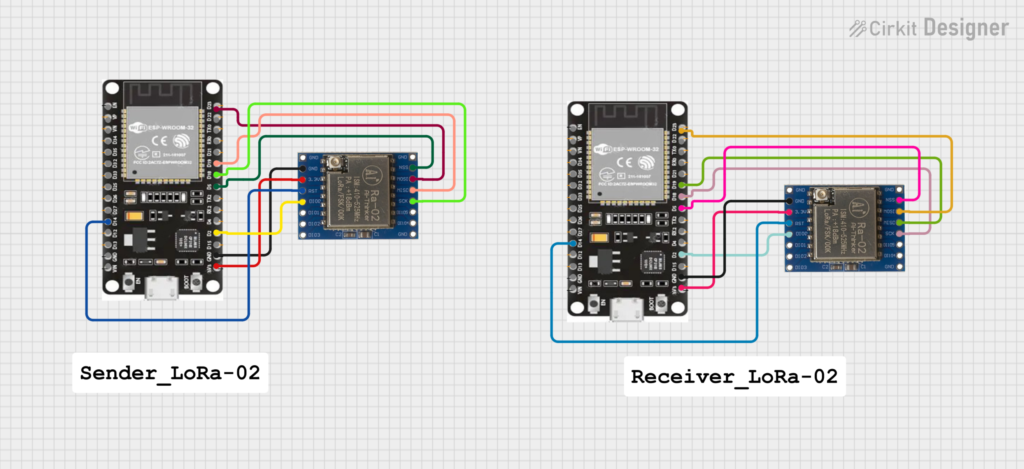
By effectively pairing the ESP32 with the LoRa-02 SX1278, developers can create a wide array of IoT solutions that leverage both short-range and long-range communication methods. This synergy not only improves the reach of your application but also adds layers of complexity and functionality that are essential in today’s interconnected world.
Sender Code
/*********
  Rui Santos & Sara Santos - Random Nerd Tutorials
  Modified from the examples of the Arduino LoRa library
  More resources: https://RandomNerdTutorials.com/esp32-lora-rfm95-transceiver-arduino-ide/
*********/
// DIO0  2
// 3.3V  3.3
// GND  any one connect
// RESET  14
// NSS 5
// SCK 18
// MOSI 23
// MISO 19


#include <SPI.h>
#include <LoRa.h>

//define the pins used by the transceiver module
#define ss 5
#define rst 14
#define dio0 2

int counter = 0;

void setup() {
  //initialize Serial Monitor
  Serial.begin(115200);
  while (!Serial);
  Serial.println("LoRa Sender");

  //setup LoRa transceiver module
  LoRa.setPins(ss, rst, dio0);

  //replace the LoRa.begin(---E-) argument with your location's frequency
  //433E6 for Asia
  //868E6 for Europe
  //915E6 for North America
  while (!LoRa.begin(868E6)) {
    Serial.println(".");
    delay(500);
  }
   // Change sync word (0xF3) to match the receiver
  // The sync word assures you don't get LoRa messages from other LoRa transceivers
  // ranges from 0-0xFF
  LoRa.setSyncWord(0xF3);
  Serial.println("LoRa Initializing OK!");
}

void loop() {
  Serial.print("Sending packet: ");
  Serial.println(counter);

  //Send LoRa packet to receiver
  LoRa.beginPacket();
  LoRa.print("hello ");
  LoRa.print(counter);
  LoRa.endPacket();

  counter++;

  delay(10000);
}Receiver Code
/*********
  Rui Santos & Sara Santos - Random Nerd Tutorials
  Modified from the examples of the Arduino LoRa library
  More resources: https://RandomNerdTutorials.com/esp32-lora-rfm95-transceiver-arduino-ide/
*********/
*********/
// DIO0  2
// 3.3V  3.3
// GND  any one connect
// RESET  14
// NSS 5
// SCK 18
// MOSI 23
// MISO 19
#include <SPI.h>
#include <LoRa.h>

//define the pins used by the transceiver module
#define ss 5
#define rst 14
#define dio0 2

void setup() {
  //initialize Serial Monitor
  Serial.begin(115200);
  while (!Serial);
  Serial.println("LoRa Receiver");

  //setup LoRa transceiver module
  LoRa.setPins(ss, rst, dio0);

  //replace the LoRa.begin(---E-) argument with your location's frequency
  //433E6 for Asia
  //868E6 for Europe
  //915E6 for North America
  while (!LoRa.begin(868E6)) {
    Serial.println(".");
    delay(500);
  }
   // Change sync word (0xF3) to match the receiver
  // The sync word assures you don't get LoRa messages from other LoRa transceivers
  // ranges from 0-0xFF
  LoRa.setSyncWord(0xF3);
  Serial.println("LoRa Initializing OK!");
}

void loop() {
  // try to parse packet
  int packetSize = LoRa.parsePacket();
  if (packetSize) {
    // received a packet
    Serial.print("Received packet '");

    // read packet
    while (LoRa.available()) {
      String LoRaData = LoRa.readString();
      Serial.print(LoRaData);
    }

    // print RSSI of packet
    Serial.print("' with RSSI ");
    Serial.println(LoRa.packetRssi());
  }
}SPI Communication Explained (Simple Words)
When detailing the pinout connection, it’s crucial to understand each pin’s function and its importance in ensuring a successful connection between the LoRa-02 SX1278 and the ESP32. Incorrect wiring can lead to communication failures, which can be frustrating during development.
LoRa-02 communicates using SPI (Serial Peripheral Interface).
SPI Pins Role
- MOSI → ESP32 sends data to LoRa
- MISO → LoRa sends data to ESP32
- SCK → Clock signal
- NSS (CS) → Selects LoRa module
- DIO0 → Interrupt pin (used for receive/transmit events)
This makes communication fast, stable, and reliable.
How Long-Range Communication Works Without Internet
LoRa uses chirp spread spectrum modulation, which:
- Sends data at low data rate
- Travels long distances
- Is highly resistant to noise
That’s why LoRa works even when:
- No Wi-Fi
- No mobile network
- Remote villages or forests
- Disaster zones
Real-Life Applications of LoRa-02 SX1278
Here’s where this setup shines:
🔹 IoT Projects
- Smart agriculture sensors
- Weather monitoring stations
🔹 Security & Safety
- Women safety devices
- SOS emergency transmitters
- Border & area surveillance
🔹 Industrial & Smart City
- Streetlight control
- Asset tracking
- Remote meter reading
Common Problems & Fixes
❌ LoRa not initializing
✔ Check NSS & RESET pins
❌ No data received
✔ DIO0 pin must be correctly connected
✔ Same frequency on both nodes
❌ Short range
✔ Use proper 433 MHz antenna
✔ Avoid indoor metal obstacles
Best Practices (Pro Tips)
✅ Use external antenna
✅ Keep SPI wires short
✅ Same Spreading Factor & Bandwidth on both ESP32s
✅ Power with stable 3.3V
✅ Test line-of-sight first
Why This Setup Is a Game-Changer
Using two ESP32 boards (Sender & Receiver) with LoRa-02 SX1278 helped many developers realize:
“Long-range communication is possible without internet, just pure radio frequency.”
This technology opens doors to affordable, scalable, and reliable IoT systems.
Conclusion
The LoRa-02 SX1278 with ESP32 is one of the best combinations for long-range, low-power wireless communication. With correct wiring, SPI configuration, and antenna setup, you can easily achieve multi-kilometer communication.
If you’re building IoT, safety, or smart devices, LoRa is not optional anymore — it’s essential 🚀



Leave a Reply
You must be logged in to post a comment.