

ESP32 Water Level Monitoring Using ESP-NOW and Float Sensors
ESP32 Water Level Monitoring in storage tanks is an important task in homes, industries, and agriculture. In this project, we build a wireless water level monitoring system using two ESP32 boards, float sensors, and the fast wireless communication protocol ESP-NOW.
The system sends water level data from one ESP32 to another without using a router or internet connection. The receiver ESP32 displays the water level status on the Serial Monitor, making the system simple, efficient, and reliable.
Introduction
Water tanks often require manual checking to determine whether the tank is empty, partially filled, or nearly full. This can be inconvenient and inefficient. By using ESP32 microcontrollers and float switches, we can automate this process and monitor water levels wirelessly.
The communication between the devices is achieved through ESP-NOW, a peer-to-peer wireless protocol developed for ESP devices. It allows fast data transmission with very low power consumption.
In this project:
- One ESP32 acts as the sender
- Another ESP32 acts as the receiver
- Two float switches detect water levels inside the tank
- Data is transmitted wirelessly and displayed in real time
Components Required
To build this project, you need the following components:
- 2 × ESP32 Development Boards
- 2 × Float Switch Sensors
- Jumper Wire 30 wire Pack
- USB Cable for Programming
- Power Supply
These components are inexpensive and widely available, making the project suitable for students and beginners.
System Overview
The system works using two ESP32 boards.
Sender ESP32
The sender is placed near the water tank. Two float sensors are installed inside the tank:
- Bottom Float Sensor – Detects when water reaches the lower level
- Middle Float Sensor – Detects when water reaches the middle level
When the water level changes, the sensors send signals to the ESP32. The ESP32 then transmits this information wirelessly using ESP-NOW. Thus, ESP32 Water Level Monitoring requires two ESP32 boards.
Receiver ESP32
The receiver ESP32 listens for incoming data from the sender. Once the data is received, it displays the tank level status on the Serial Monitor.
An LED connected to GPIO 2 is also used as a connection indicator:
- LED ON → Communication active
- LED OFF → Sender not detected
Water Level Detection Logic
The two float sensors determine the water level inside the tank.
| Bottom Sensor | Middle Sensor | Tank Status |
|---|---|---|
| 0 | 0 | Tank Empty |
| 1 | 0 | Water at Bottom Level |
| 1 | 1 | Water at Middle Level |
This logic allows the system to determine the tank condition using just two sensors.
How ESP-NOW Communication Works
ESP-NOW is a connectionless communication protocol that allows ESP32 devices to exchange data directly without WiFi routers.
Key advantages of ESP-NOW include:
- Fast wireless communication
- Low latency
- No internet required
- Low power consumption
- Simple peer-to-peer setup
Each ESP32 device has a unique MAC address. The sender ESP32 uses the receiver’s MAC address to send data directly.
Serial Monitor Output
When the system is running, the receiver ESP32 prints the tank status on the Serial Monitor.
Example output:
===== WATER LEVEL DATA =====
Bottom Sensor: 1
Middle Sensor: 1
Water reached MIDDLE level
=============================
This allows the user to quickly determine the tank condition.
Advantages of This Project
This wireless water monitoring system has several advantages:
- Simple and low-cost design
- Wireless communication without internet
- Real-time water level monitoring
- Easy to expand with more sensors
- Suitable for educational and IoT projects
The project is also a great example for students learning about embedded systems and IoT.
Sender ESP32 Code (Float Sensors)
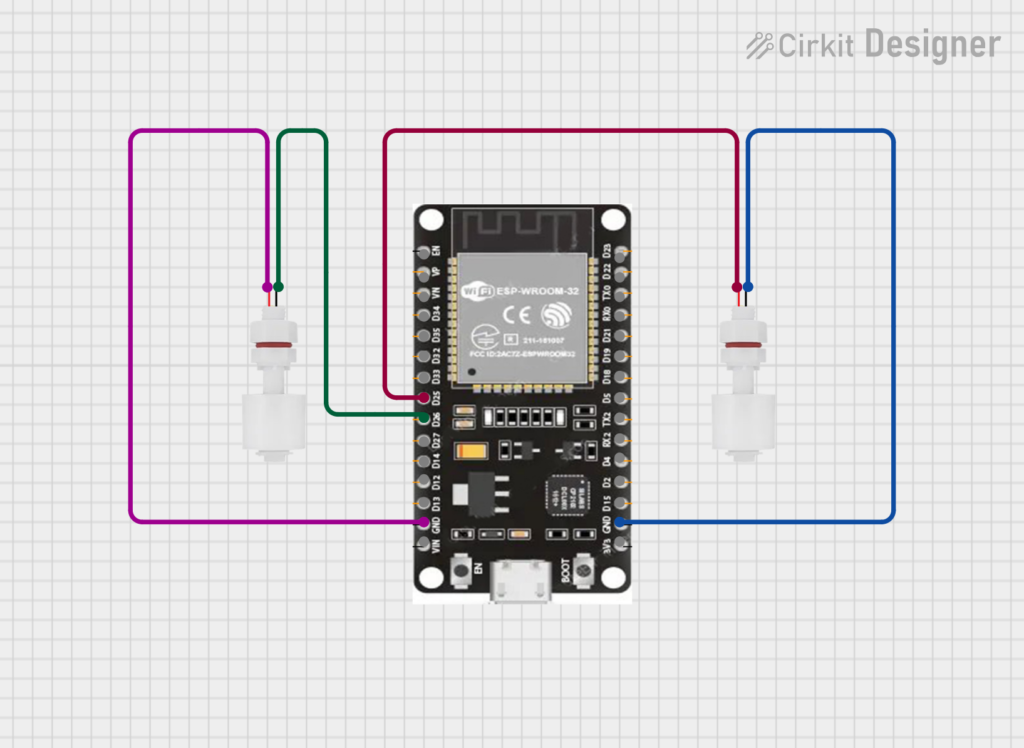
This ESP32 reads two float sensors placed in the tank and sends the data wirelessly to the receiver ESP32.
ESP32 Water Level Monitoring Using ESP-NOW and Float Sensors
Connections
| Float Sensor | ESP32 Pin |
|---|---|
| Bottom Float Sensor | GPIO 25 |
| Middle Float Sensor | GPIO 26 |
| LED Indicator | GPIO 2 |
#include <esp_now.h>
#include <WiFi.h>

#define FLOAT_TOP 26
#define FLOAT_BOTTOM 25
#define LED 2

// Receiver MAC Address
uint8_t receiverMAC[] = {0xB0,0xCB,0xD8,0xCF,0x73,0x84};

// Structure to send data
typedef struct struct_message {
  int top;
  int bottom;
} struct_message;

struct_message waterData;

esp_now_peer_info_t peerInfo;

// Callback when data is sent
void OnDataSent(const uint8_t *mac_addr, esp_now_send_status_t status)
{
  if (status == ESP_NOW_SEND_SUCCESS)
  {
    Serial.println("Data Sent Successfully");
    digitalWrite(LED, HIGH);
  }
  else
  {
    Serial.println("Data Send Failed");
    digitalWrite(LED, LOW);
  }
}

void setup()
{
  Serial.begin(115200);

  pinMode(FLOAT_TOP, INPUT_PULLUP);
  pinMode(FLOAT_BOTTOM, INPUT_PULLUP);
  pinMode(LED, OUTPUT);

  WiFi.mode(WIFI_STA);

  if (esp_now_init() != ESP_OK)
  {
    Serial.println("ESP-NOW Initialization Failed");
    return;
  }

  esp_now_register_send_cb(OnDataSent);

  memcpy(peerInfo.peer_addr, receiverMAC, 6);
  peerInfo.channel = 0;
  peerInfo.encrypt = false;

  if (esp_now_add_peer(&peerInfo) != ESP_OK)
  {
    Serial.println("Failed to add peer");
    return;
  }

  Serial.println("ESP-NOW Sender Ready");
}

void loop()
{
  waterData.top = digitalRead(FLOAT_TOP);
  waterData.bottom = digitalRead(FLOAT_BOTTOM);

  esp_now_send(receiverMAC, (uint8_t *)&waterData, sizeof(waterData));

  Serial.print("Bottom Sensor: ");
  Serial.println(waterData.bottom);

  Serial.print("Middle Sensor: ");
  Serial.println(waterData.top);

  Serial.println("---------------------");

  delay(1000);
}
Receiver ESP32 Code (Serial Monitor Output)
This ESP32 receives water level data and prints the tank status in the Serial Monitor.
It also turns the built-in LED OFF if communication stops.
#include <esp_now.h>
#include <WiFi.h>

#define LED 2
#define TIMEOUT 3000

typedef struct struct_message {
  int top;
  int bottom;
} struct_message;

struct_message waterData;

unsigned long lastReceiveTime = 0;

void OnDataRecv(const uint8_t * mac, const uint8_t *incomingData, int len)
{
  memcpy(&waterData, incomingData, sizeof(waterData));

  lastReceiveTime = millis();
  digitalWrite(LED, HIGH);

  Serial.println("===== WATER LEVEL DATA =====");

  Serial.print("Bottom Sensor: ");
  Serial.println(waterData.bottom);

  Serial.print("Middle Sensor: ");
  Serial.println(waterData.top);

  if(waterData.bottom == 0 && waterData.top == 0)
  {
    Serial.println("Tank EMPTY");
  }
  else if(waterData.bottom == 1 && waterData.top == 0)
  {
    Serial.println("Water reached BOTTOM level");
  }
  else if(waterData.bottom == 1 && waterData.top == 1)
  {
    Serial.println("Water reached MIDDLE level");
  }

  Serial.println("=============================");
}

void setup()
{
  Serial.begin(115200);

  pinMode(LED, OUTPUT);
  digitalWrite(LED, LOW);

  WiFi.mode(WIFI_STA);

  Serial.print("Receiver MAC Address: ");
  Serial.println(WiFi.macAddress());

  if (esp_now_init() != ESP_OK)
  {
    Serial.println("ESP-NOW Initialization Failed");
    return;
  }

  esp_now_register_recv_cb(esp_now_recv_cb_t(OnDataRecv));

  Serial.println("ESP-NOW Receiver Ready");
}

void loop()
{
  if (millis() - lastReceiveTime > TIMEOUT)
  {
    digitalWrite(LED, LOW);
  }
}
Expected Serial Monitor Output
===== WATER LEVEL DATA =====
Bottom Sensor: 1
Middle Sensor: 1
Water reached MIDDLE level
=============================
Possible Improvements
This project can be enhanced further with additional features such as:
- Automatic water pump control
- Mobile notifications when the tank is full
- Web dashboard monitoring
- Battery-powered remote sensors
- Integration with home automation systems
These improvements can transform the project into a fully automated water management system.
Conclusion
In this project, we created a wireless water level monitoring system using ESP32 microcontrollers, float sensors, and ESP-NOW communication. The system successfully detects water levels and sends the data wirelessly to another ESP32 for monitoring.
Because it does not require a WiFi router or internet connection, this solution is reliable and efficient for many real-world applications.
This project is especially useful for students, hobbyists, and engineers interested in IoT and embedded system design.


Leave a Reply
You must be logged in to post a comment.