

16Dec
Motion Detected: ESP32 with PIR Sensor (HC-SR501)
🧠 What is a PIR Sensor?
PIR = Passive Infrared Sensor
- A PIR sensor detects motion by measuring changes in infrared radiation.
- Every warm object (like humans and animals) emits infrared (IR) radiation.
- PIR sensors don’t emit anything; they only detect IR changes. That’s why they are called passive.
🧪 How Does It Work?
- The PIR sensor has two slots made of pyroelectric sensors.
- When a human or animal moves in front of the sensor, one slot sees more IR radiation than the other.
- This sudden change causes a voltage difference and the sensor outputs HIGH (3.3V or 5V) for a short time.
So in short:
👉 No motion → LOW output
👉 Motion detected → HIGH output
🧰 Components Required
| Component | Quantity |
|---|---|
| ESP32 board | 1 |
| HC-SR501 PIR sensor | 1 |
| Jumper wires | few |
| Breadboard (optional) | 1 |
| LED + 220Ω resistor (optional) | 1 |
📟 PIR Sensor Pin Description (HC-SR501)
| Pin | Description |
|---|---|
| VCC | Power supply (3.3V or 5V) |
| OUT | Digital output (HIGH when motion detected) |
| GND | Ground |
There are two knobs on the sensor:
- Time Delay – Adjust how long output stays HIGH after motion.
- Sensitivity – Adjust how far motion can be detected (typically up to 6 meters).
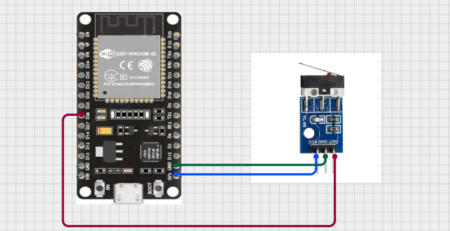
🔌 Circuit Diagram – Connect PIR Sensor to ESP32
| PIR Sensor Pin | ESP32 Pin |
|---|---|
| VCC | 3.3V or 5V |
| GND | GND |
| OUT | GPIO 14 (any digital pin) |
If you’re using an LED for indication, connect:
- LED anode (+) → GPIO 2 (or any other GPIO)
- LED cathode (–) → 220Ω resistor → GND🔍 How to Test?
- Upload the code to ESP32.
- Open Serial Monitor at 115200 baud rate.
- Move your hand in front of the PIR sensor — you’ll see
Motion Detected! - Stay still — you’ll see
No Motion. - LED should turn ON/OFF according to motion.
➡️ No, PIR only detects line-of-sight IR radiation. It cannot see through walls or glass.Q2: Can PIR detect small objects?
➡️ It depends on heat and movement. It’s good at detecting humans and large animals.Q3: Is PIR sensor affected by sunlight or heat?
➡️ Yes, strong sunlight or high ambient temperature can affect sensitivity.
HOW TO OPERATE

#define pir 12

void setup() {
  pinMode(pir,INPUT);
  Serial.begin(9600);
  Serial.println("Device Started");
  Serial.println("Hello Bros");

}

void loop() {

  int data = digitalRead(pir);
  if(pir==0)
  Serial.println("Device is off");
  else
  Serial.println("Device is on");

}📌 Upload this using Arduino IDE. Make sure to select the right Board: ESP32 Dev Module and COM port.





Leave a Reply
You must be logged in to post a comment.