

15Dec
DFPlayer Mini with Esp32
🎵 What is DFPlayer Mini?
The DFPlayer Mini is a tiny, standalone MP3 audio player module. It can play audio files (MP3/WAV) stored on a microSD card. You can control it through:
- Serial communication (UART with ESP32 or Arduino)
- Built-in IO pins (for button-triggered audio)
- Library-based commands to control volume, play/pause, next, loop, etc.
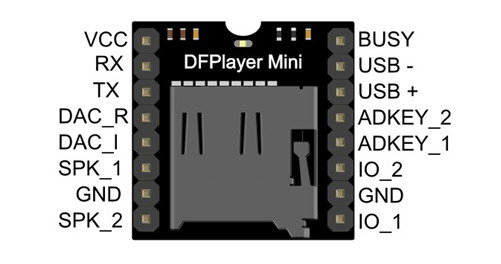
📦 DFPlayer Mini Pinout
| Pin | Function |
|---|---|
| VCC | Power (3.2V–5V) |
| GND | Ground |
| TX | Serial Transmit (connect to ESP32 RX) |
| RX | Serial Receive (connect to ESP32 TX) |
| SPK1, SPK2 | Speaker output (mono, 3W) |
| DAC_L/R | Stereo line out (for headphones/amp) |
| IO1/IO2 | Button control |
| BUSY | LOW when playing |
🔌 Wiring DFPlayer Mini with ESP32
🔧 ESP32 to DFPlayer Mini (Serial Connection):
| DFPlayer Pin | ESP32 Pin |
|---|---|
| VCC | 5V |
| GND | GND |
| TX | GPIO16 (RX2) |
| RX | GPIO17 (TX2) via 1K resistor |
| SPK1 & SPK2 | 3W Speaker |
📌 Note: Always use a 1K resistor between ESP32 TX and DFPlayer RX to protect the module from 3.3V logic level mismatch.
📁 SD Card Preparation
- Format as FAT32.
- Name files as:
001.mp3,002.mp3, etc. - Folder structure (optional):
/MP3/001.mp3, 002.mp3... /01/001.mp3, 002.mp3...
📚 Arduino Library
Install DFRobotDFPlayerMini from the Library Manager:
- Open Arduino IDE → Sketch → Include Library → Manage Libraries → Search “DFRobotDFPlayerMini”
🧠 Useful Functions
| Function | Description |
|---|---|
play(n) | Play track n |
next() / previous() | Next/previous track |
volume(n) | Set volume (0–30) |
loop(n) | Loop track n |
pause() / start() | Pause/resume playback |
stop() | Stop playback |
playFolder(f, n) | Play n.mp3 from folder f |
isPlaying() | Returns true if music is playing |
🔊 Advanced Use: Speaker or Stereo?
- For direct speaker → Use
SPK1&SPK2(mono, 3W). - For headphones or amplifier → Use
DAC_L&DAC_R.
🔧 Troubleshooting
| Problem | Fix |
|---|---|
| “Initialization failed” | Check RX/TX wiring, power, 1K resistor |
| Not playing audio | Format SD card to FAT32, correct file names |
| No sound | Check speaker, use DAC if needed |
| Volume too low | Use myDFPlayer.volume(30); |
🚀 Applications
- Alarm or security system
- Self-defense device (Safeguard+)
- Talking toys or robots
- Museum guide systems
- Audio reminders for elderly
HOW TO OPERATE

#include <HardwareSerial.h>
#include <DFRobotDFPlayerMini.h>

HardwareSerial mySerial(2);  // Use UART1 (Serial1 on ESP32)
DFRobotDFPlayerMini myDFPlayer;

void setup() {
  Serial.begin(115200);  // ✅ Initializes Serial Monitor for debugging (USB output to PC)

  mySerial.begin(9600, SERIAL_8N1, 16, 17);  // RX, TX (DFPlayer communication)

  // ✅ Prints message to Serial Monitor (helps to see status)
  Serial.println("Initializing DFPlayer...");

  // ✅ Tries to initialize DFPlayer and prints error if failed
  if (!myDFPlayer.begin(mySerial)) {
    Serial.println("DFPlayer not detected.");  // ✅ Shown if no communication with DFPlayer
    while (1);  // ✅ Stops further execution
  }

  // ✅ Success message if DFPlayer is connected
  Serial.println("DFPlayer connected!");

  myDFPlayer.volume(30);  // Set volume (0 to 30)
  myDFPlayer.play(2);     // Play first track (0001.mp3)
}

void loop() {
  // No Serial commands here
}


Leave a Reply
You must be logged in to post a comment.