

ESP32 with BNO055 Sensor Complete Guide
The BNO055 sensor is one of the most advanced smart orientation sensors available for IoT and embedded systems projects. If you are working with an ESP32 development board and need accurate motion tracking, acceleration sensing, orientation detection, or gesture-based projects, then the BNO055 sensor is an excellent choice. This guide serves as an essential ESP32 BNO055 tutorial for integrating the sensor. This ESP32 BNO055 tutorial will help you understand how to implement the sensor effectively.
In this complete tutorial, you will learn:
- What is the BNO055 sensor
- Features of the BNO055
- ESP32 and BNO055 pinout
- Circuit wiring connection
- How to install libraries
- Arduino code for ESP32 with BNO055
- Acceleration measurement
- Applications of the BNO055 sensor
- Troubleshooting guide
This tutorial is beginner-friendly and optimized for practical IoT projects.
What is the BNO055 Sensor?
In this ESP32 BNO055 tutorial, you will explore the various functionalities and applications of the sensor.
The BNO055 is a smart 9-axis absolute orientation sensor developed by Bosch. Unlike traditional IMU sensors, the BNO055 includes an onboard microcontroller that performs sensor fusion internally.
The sensor combines:
- 3-axis Accelerometer
- 3-axis Gyroscope
- 3-axis Magnetometer
This allows the sensor to directly provide orientation and motion data without requiring complex calculations on the ESP32.
The BNO055 sensor is widely used in:
- Robotics
- Smart wearables
- Motion tracking
- Gesture recognition
- VR applications
- Self-balancing robots
- Smart pens
- Drone stabilization
Key Features
- 9-axis motion tracking
- Built-in sensor fusion algorithm
- I2C and UART communication support
- Low power consumption
- Accurate orientation sensing
- Gravity-free linear acceleration output
- Supports quaternion and Euler angle outputs
- Operating voltage: 3.3V
- Compact module size
Why Use ESP32 with BNO055?
The ESP32 is ideal for motion sensing projects because:
- Fast dual-core processor
- Built-in WiFi and Bluetooth
- Multiple I2C pins
- High-speed data processing
- Low power operation
- Perfect for IoT applications
BNO055 Pinout
| BNO055 Pin | Function |
|---|---|
| VIN | Power Input |
| GND | Ground |
| SDA | I2C Data |
| SCL | I2C Clock |
| RST | Reset Pin |
| INT | Interrupt Pin |
| ADR | I2C Address Selection |
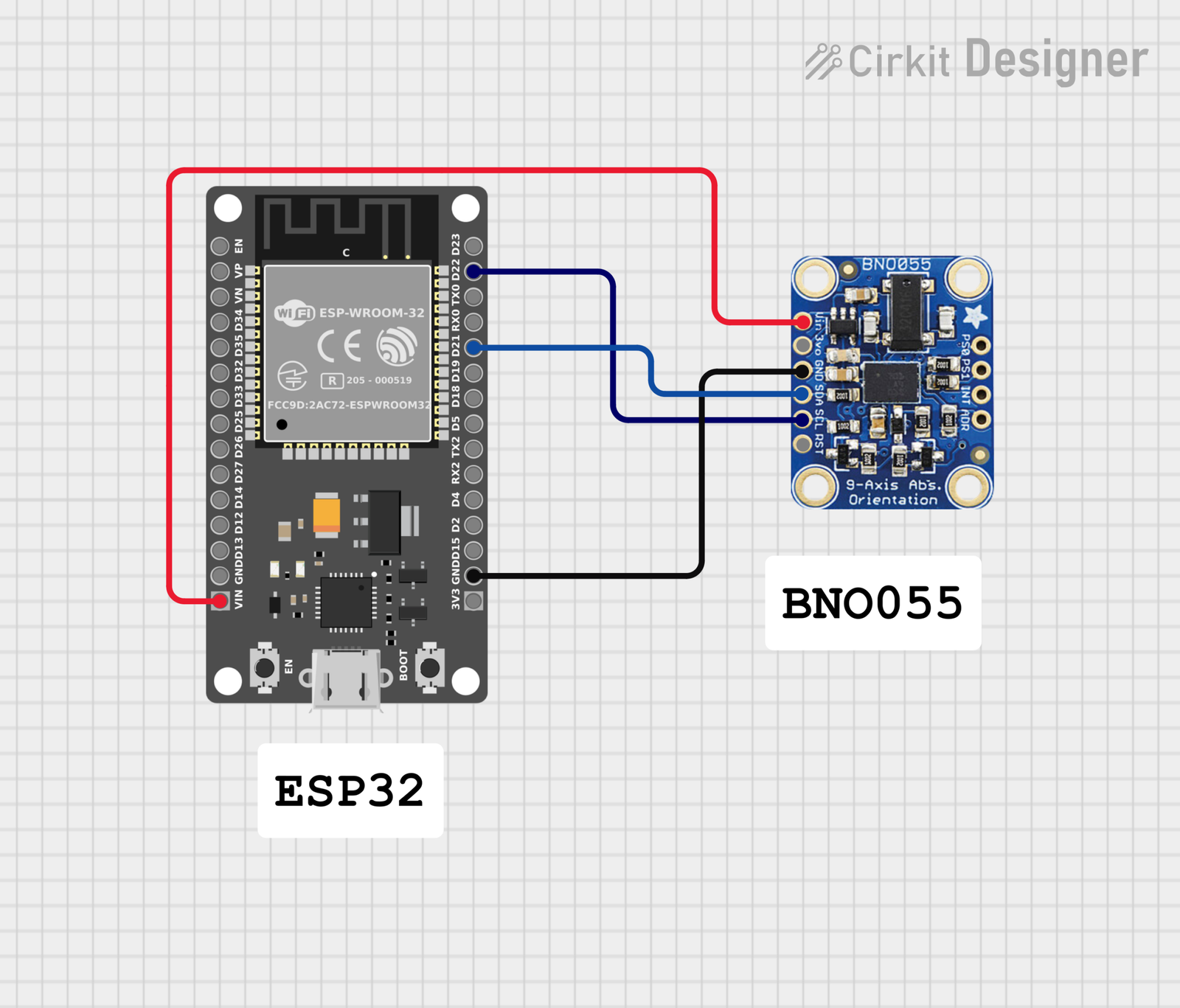
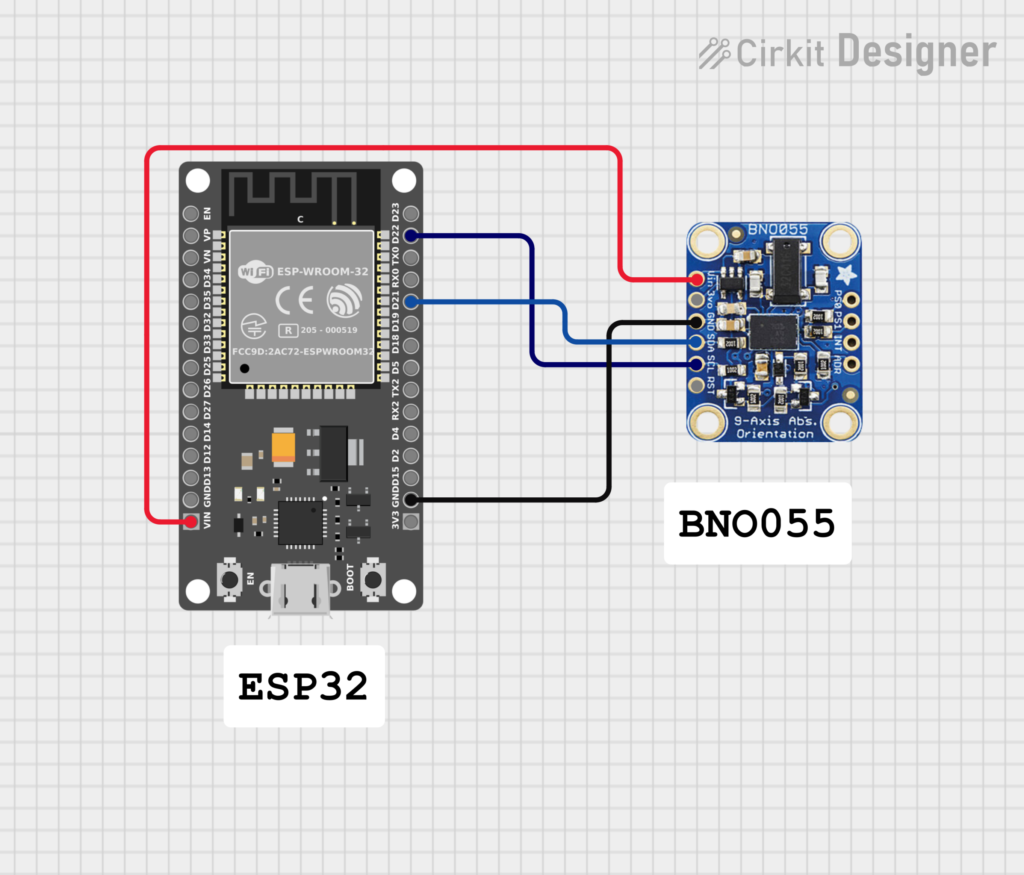
ESP32 to BNO055 Wiring Connection
Connection Table
| BNO055 | ESP32 |
| VIN | 3.3V |
| GND | GND |
| SDA | GPIO 21 |
| SCL | GPIO 22 |
Code
#include <Wire.h>
#include <Adafruit_Sensor.h>
#include <Adafruit_BNO055.h>

Adafruit_BNO055 bno = Adafruit_BNO055(55, 0x28);

void setup() {
  Serial.begin(115200);

  if (!bno.begin()) {
    Serial.println("BNO055 not detected");
    while (1);
  }

  delay(1000);

  bno.setExtCrystalUse(true);

  Serial.println("BNO055 Started");
}

void loop() {

  imu::Vector<3> accel =
    bno.getVector(Adafruit_BNO055::VECTOR_LINEARACCEL);

  float ax = accel.x();
  float ay = accel.y();
  float az = accel.z();

  float totalAccel = sqrt(ax * ax + ay * ay + az * az);

  Serial.print("AX: ");
  Serial.print(ax);
  Serial.print(" m/s²  ");

  Serial.print("AY: ");
  Serial.print(ay);
  Serial.print(" m/s²  ");

  Serial.print("AZ: ");
  Serial.print(az);
  Serial.print(" m/s²  ");

  Serial.print("TOTAL: ");
  Serial.print(totalAccel);
  Serial.println(" m/s²");

  delay(100);
}The BNO055 communicates with the ESP32 using the I2C protocol.
- SDA is connected to GPIO 21
- SCL is connected to GPIO 22
- Power the sensor using 3.3V
- Common ground connection is mandatory
The ESP32 reads orientation and acceleration data directly from the sensor.
Circuit Diagram
Installing Required Libraries
Before uploading the code, install the required libraries.
Steps
Install both libraries
Open Arduino IDE
Go to Sketch → Include Library → Manage Libraries
Search for:
Adafruit BNO055
Adafruit Unified Sensor
How the Code Works
Step 1: Initialize the Sensor
The ESP32 initializes the BNO055 using I2C communication.
Adafruit_BNO055 bno = Adafruit_BNO055(55, 0x28);
Step 2: Read Linear Acceleration
The code reads acceleration values with gravity removed.
bno.getVector(Adafruit_BNO055::VECTOR_LINEARACCEL);
Step 3: Calculate Total Acceleration
The total acceleration is calculated using:
sqrt(ax * ax + ay * ay + az * az);
Serial Monitor Output
Example output:
AX: 0.12 m/s² AY: -0.05 m/s² AZ: 0.01 m/s² TOTAL: 0.13 m/s²
Applications of ESP32 with BNO055
1. Smart Wearable Devices
Used for motion detection and activity tracking.
2. Gesture Control Systems
Detect hand movement and orientation.
3. Smart Pen Projects
Track writing speed, pressure estimation, and pen movement.
4. Drone Stabilization
Provides orientation and tilt information.
5. Robotics
Helps robots maintain balance and navigation.
6. Virtual Reality Systems
Used for head tracking and motion sensing.
Advantages of BNO055 Sensor
- Easy to use
- Built-in sensor fusion
- Accurate orientation tracking
- Less CPU usage on ESP32
- Beginner-friendly library support
- Supports multiple motion outputs
Common Problems and Solutions
BNO055 Not Detected
Solution
- Check SDA and SCL connections
- Verify power supply
- Confirm I2C address is 0x28 or 0x29
This ESP32 BNO055 tutorial will guide you through real-world applications and unique integrations.
Random Values in Serial Monitor
Solution
- Use external crystal
- Keep wires short
- Add stable power supply
No Data Output
Solution
- Install proper libraries
- Select correct ESP32 board in Arduino IDE
- Check COM port selection
Best ESP32 Projects Using BNO055
Here are some advanced projects you can build:
- Air mouse using motion sensing
- Gesture-controlled robot
- Smart security stick
- Human activity recognition system
- Motion-controlled wheelchair
- VR motion controller
- Handwriting analysis pen
Performance Tips
For better performance:
- Use 3.3V regulated power
- Use shielded wires in noisy environments
- Add filtering for smoother readings
- Use calibration before taking measurements
Frequently Asked Questions?
Is BNO055 better than MPU6050?
Yes. The BNO055 has built-in sensor fusion and provides direct orientation data, making it easier to use than the MPU6050.
Can ESP32 read orientation directly?
Yes. The BNO055 processes orientation internally and sends ready-to-use data to the ESP32.
What communication protocol does BNO055 use?
The sensor supports I2C and UART communication.
Can BNO055 detect movement speed?
Yes. By integrating acceleration data, velocity and movement speed can be estimated.
Conclusion
The ESP32 with BNO055 sensor combination is perfect for advanced motion sensing and IoT projects. The BNO055 simplifies complex calculations by handling sensor fusion internally, making it easier for beginners and professionals alike.
Whether you are building a smart wearable, robotics project, gesture controller, or graphology smart pen, the BNO055 provides highly accurate motion and orientation data.
With the ESP32’s wireless capabilities and processing power, you can create powerful real-time motion tracking systems with ease.





Leave a Reply
You must be logged in to post a comment.