

ESP32 HW-138 TTP224 4 Touch Control System for Smart Automation
The ESP32 HW-138 4 Touch Control System is a modern capacitive touch-based control solution that replaces traditional mechanical switches. Using the HW-138 4-touch pad module, you can control multiple devices such as LEDs, buzzers, relays, or motors with simple finger touch input.
This project is ideal for smart home systems, industrial control panels, and IoT-based automation projects.
What is HW-138 4 Touch Module?
The HW-138 module is a 4-channel capacitive touch sensor board based on the TTP224 IC.
It provides four independent touch pads, each producing a digital output signal when touched.
Key Features:
- 4 independent touch inputs
- Low power consumption
- Digital output interface
- Works with 3.3V and 5V
- Stable capacitive sensing
Because of its reliability, the ESP32 HW-138 4 Touch Control System is perfect for replacing push buttons in automation systems.
How ESP32 HW-138 4 Touch Control System Works
The working principle of the ESP32 HW-138 4 Touch Control System is simple:
- A user touches one of the four capacitive pads.
- The HW-138 module detects the change in capacitance.
- The module sends a HIGH signal on the corresponding output pin.
- The ESP32 reads the signal.
- The ESP32 activates the assigned device (LED, buzzer, motor, etc.).
Each pad can be programmed for a different function, making the system highly flexible.
Components Required
- ESP32 Development Board
- HW-138 4 Touch Sensor Module
- LED
- Buzzer
- Relay Module (optional)
- Jumper Wires
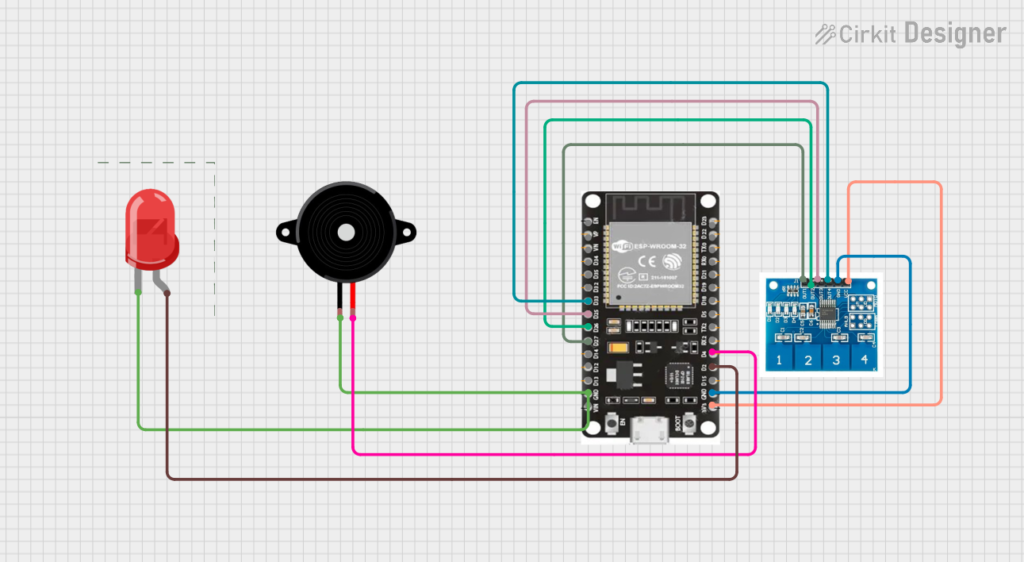
ESP32 HW-138 4 Touch Control System Wiring
| HW-138 Pin | ESP32 GPIO |
|---|---|
| VCC | 3.3V |
| GND | GND |
| OUT1 | GPIO 27 |
| OUT2 | GPIO 26 |
| OUT3 | GPIO 25 |
| OUT4 | GPIO 33 |
| LED | GPIO 2 |
| Buzzer | GPIO 4 |
⚠ Always power the module with 3.3V when using ESP32.
ESP32 HW-138 TTP224 4 Touch Control System Code
#define TOUCH1 27
#define TOUCH2 26
#define TOUCH3 25
#define TOUCH4 33

#define LED 2
#define BUZZER 4

void setup() {
  Serial.begin(115200);

  pinMode(TOUCH1, INPUT);
  pinMode(TOUCH2, INPUT);
  pinMode(TOUCH3, INPUT);
  pinMode(TOUCH4, INPUT);

  pinMode(LED, OUTPUT);
  pinMode(BUZZER, OUTPUT);

  Serial.println("ESP32 HW-138 TTP224 4 Touch Control System Started");
}

void loop() {

  if(digitalRead(TOUCH1) == HIGH) {
    digitalWrite(LED, HIGH);
  }

  if(digitalRead(TOUCH2) == HIGH) {
    digitalWrite(LED, LOW);
  }

  if(digitalRead(TOUCH3) == HIGH) {
    digitalWrite(BUZZER, HIGH);
  }

  if(digitalRead(TOUCH4) == HIGH) {
    digitalWrite(BUZZER, LOW);
  }

  delay(100);
}
Applications of ESP32 HW-138 TTP224 4 Touch Control System
The ESP32 HW-138 TTP224 4 Touch Control System can be used in:
- Smart home touch panels
- Industrial machine control boards
- Touch-based password systems
- IoT automation projects
- Robot control interfaces
- Security alarm panels
Because there are no mechanical parts, the system offers long operational life.
Advantages of ESP32 HW-138 TTP224 4 Touch Control System
✔ No mechanical wear and tear
✔ Modern touch interface
✔ Easy integration with ESP32
✔ Low power consumption
✔ Expandable for IoT projects
✔ Cost-effective solution
FAQ – ESP32 HW-138 TTP224 4 Touch Control System
Q1. Can TTP224 work with ESP32 3.3V logic?
Yes, it is fully compatible.
Q2. Can I use it in toggle mode?
Yes, the module supports toggle configuration.
Q3. Can I control AC appliances?
Yes, using a relay module.
Conclusion
The ESP32 HW-138 TTP224 4 Touch Control System is an advanced yet beginner-friendly project for smart automation. By combining ESP32 with the TTP224 capacitive touch controller, you can design reliable and modern touch-based control systems.
This project is ideal for engineering students, IoT enthusiasts, and industrial automation beginners.
Troubleshooting
Touch not detected?
- Check 3.3V supply
- Verify GPIO mapping
- Test outputs using Serial Monitor
Continuous triggering?
- Reduce electrical noise
- Keep wires short
- Check solder jumper configuration



Leave a Reply
You must be logged in to post a comment.