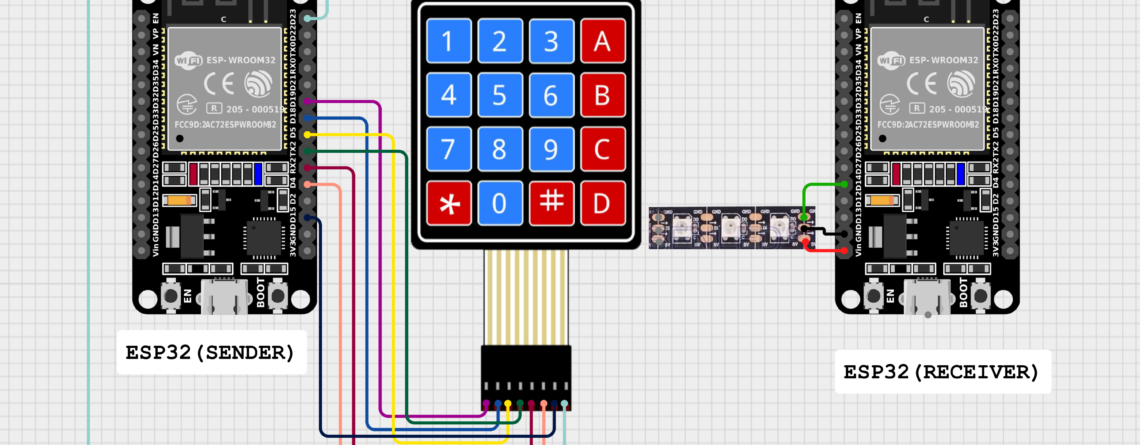
ESP-NOW ESP32: Powerful Wireless Communication Tutorial with Keypad & NeoPixel

What is ESP-NOW ESP32?ESP-NOW ESP32 is widely used in offline IoT projects where fast, reliable, and low-power communication is required. Using ESP-NOW ESP32, multiple ESP32 boards can communicate directly without depending on Wi-Fi routers or cloud servers, making ESP-NOW ESP32 ideal for real-time control systems and battery-operated devices.👉 ESP-NOW works on top of the 2.4 GHz Wi-Fi radio, but does not require Wi-Fi connection.Key Features of ESP-NOW ESP32📡 Peer-to-peer communication (up to 20 devices)⚡ Ultra-fast transmission (few milliseconds delay)🔋 Low...

Read more...

Rotary Encoder with Esp32

 23-07-2025📌 What is a Rotary Encoder?A rotary encoder is an electro-mechanical sensor that converts the angular position or motion of a rotating shaft into digital signals. Unlike a potentiometer, it can rotate infinitely in either direction and is commonly used in digital volume knobs, step selection, or menu navigation.In this blog post, we will explore the functionality, applications, and code implementations of rotary encoders with the ESP32 microcontroller.They are crucial for applications requiring precise control and feedback, making them essential components in various electronic devices and systems.There...

Read more...
arduino-training-serial-console-day5

What is Serial Communication in Arduino

What is Serial Communication in Arduino? Serial communication between the Arduino board and a computer or other devices. All Arduino boards have at least one serial port (also known as a UART or USART), and some have several.BOARD USB CDC NAME SERIAL PINS SERIAL1 PINS SERIAL2 PINS SERIAL3 PINSUno, Nano, Mini0(RX), 1(TX)Mega0(RX), 1(TX)19(RX), 18(TX)17(RX), 16(TX)15(RX), 14(TX)Leonardo, Micro, YúnSerial0(RX), 1(TX)Uno WiFi Rev.2Connected to USB0(RX), 1(TX)Connected to NINAMKR boardsSerial13(RX), 14(TX)ZeroSerialUSB (Native USB Port only)Connected to Programming Port0(RX), 1(TX)DueSerialUSB (Native USB Port only)0(RX), 1(TX)19(RX), 18(TX)17(RX), 16(TX)15(RX), 14(TX)101Serial0(RX), 1(TX)On Uno,...

Read more...
arduino-training-day4

Basic Functions of Arduino

Basic Functions of Arduino Configures the specified pin to behave either as an input or an output and other basic operation. pinMode() DescriptionConfigures the specified pin to behave either as an input or an output. See the Digital Pins page for details on the functionality of the pins.As of Arduino 1.0.1, it is possible to enable the internal pullup resistors with the mode INPUT_PULLUP. Additionally, the INPUT mode explicitly disables the internal pullups.SyntaxpinMode(pin, mode)Parameterspin: the Arduino pin number to set the mode of. mode: INPUT, OUTPUT, or INPUT_PULLUP. See the Digital Pins page for...

Read more...
arduino variable

What is Variable in Arduino

In short What is Variable in ArduinoA variable is a named unit of data that may be assigned a value. variable is a named location in a memory where a program can manipulate the data. This location is used to hold the value of the variable. The value of the C variable may get change in the program. variable might be belonging to any of the data type like int, float, char etc.RULES FOR NAMING VARIABLEVariable name must...

Read more...