motion sensor tutorial

Arduino PIR Motion Sensor Tutorial

PIR modules have a 3-pin connection at the side or bottom. The pinout may vary between modules so triple-check the pinout! It's often silkscreened on right next to the connection (at least, ours is!) One pin will be ground, another will be signal and the final one will be power. Power is usually 3-5VDC input. When object comes in detecting area it will return 1 from output pin otherwise it return 0. The IR sensor itself is housed in a hermetically sealed metal can to improve...

Read more...

Getting started Python on Google Cloud TPUs

As we all know that Now Days Python is growing faster in term of most loved programming language for Internet of things, Machine Learning , Data Science, Web application and AI.Sometimes it is hard to setup python in local machine for fresher. Here i am explaining about how can u get started in python without installing it locally.Just copy and paste this link to your browser or hit start from herehttps://colab.research.google.com

Read more...

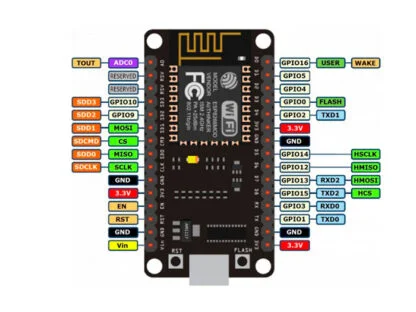
What is Node MCU

NodeMCU is an open-source hardware and software development environment built around the inexpensive ESP8266 Wi-Fi System-on-a-Chip (SoC). It's a popular choice for Internet of Things (IoT) projects due to its low cost and ease of use.Key features of NodeMCU:ESP8266 Wi-Fi chip: This provides built-in Wi-Fi connectivity for wireless communication.Lua scripting language: NodeMCU uses Lua for programming, which is a lightweight and easy-to-learn language.Open-source firmware: The firmware is freely available, allowing for customization and development.GPIO pins: These pins can be used...

Read more...

Safe Off Switch to Power Down Your Raspberry Pi

Some time it is hard to find solution for raspberry pi.This time we are solving issue : how to Power Down Your Raspberry Pi using GPIO.Step1:copy script from power_hold.pyStep2: sudo apt install python3-gpiozero#connect button GPIO 21 and GND#run below command to testpython3 power_hold.py# hold button(gpio21 and GND) for 2 second . your pi will be shutdown.If it is ok then power on your pi3 againStep3:Now execute your script ,when raspberry pi power on every time. sudo nano /etc/rc.local in rc.local file at...

Read more...