

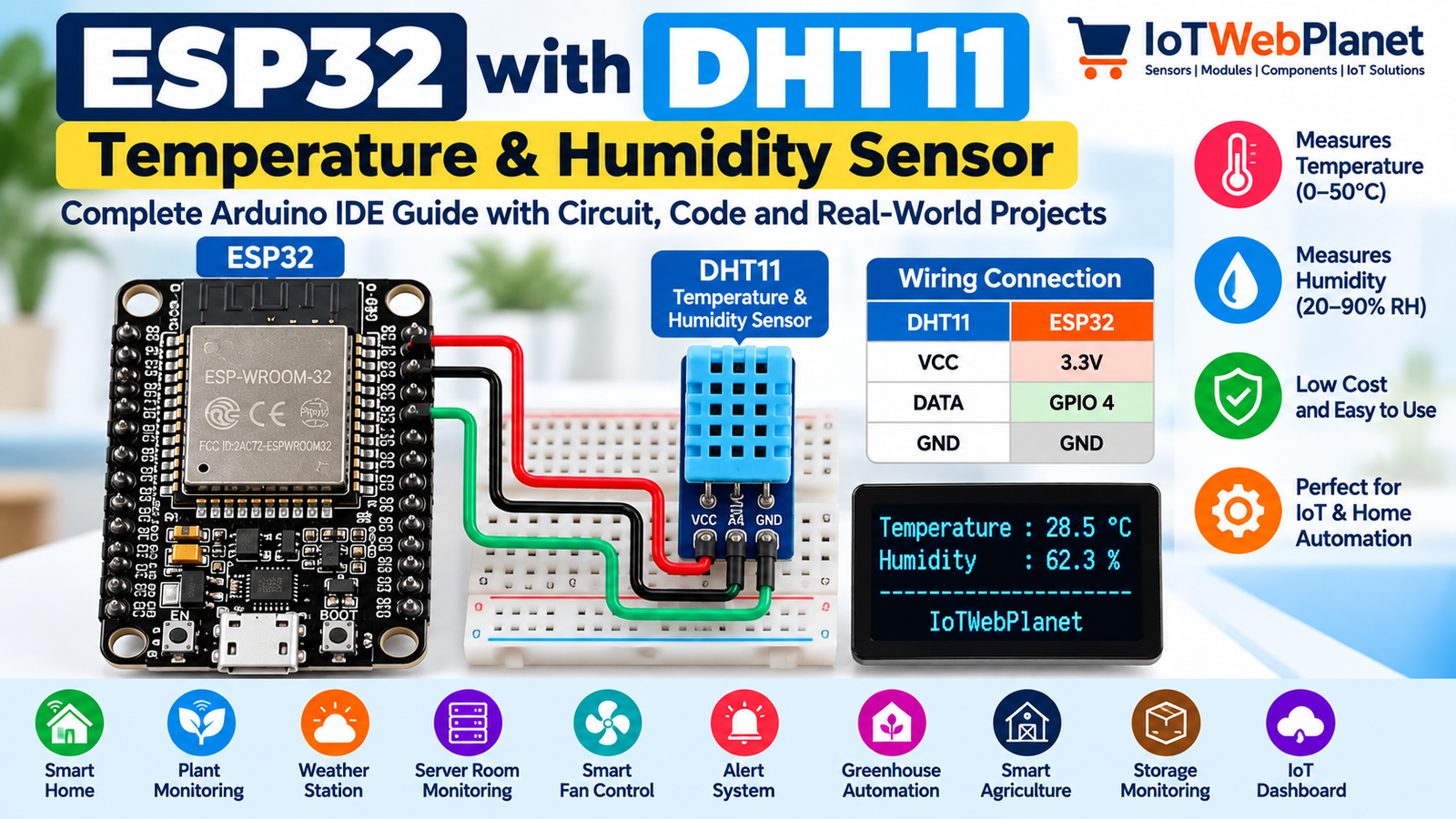
ESP32 with DHT11 Temperature & Humidity Sensor – Complete Arduino IDE Guide
The DHT11 Sensor Module is a simple digital temperature and humidity sensor that works very well with ESP32 for beginner IoT, weather and automation projects. IoTWebPlanet SKU IWP-00365 is currently listed in stock and includes three female-to-female wires.
Components Required
- DHT11 Sensor Module – Buy from IoTWebPlanet
- ESP32 30-pin development board
- 3 jumper wires (included with the listed module)
- USB data cable
What is the DHT11 Sensor Module?
DHT11 measures ambient temperature and relative humidity and sends the readings digitally to a microcontroller. With ESP32, those measurements can also be sent over Wi-Fi to dashboards, MQTT brokers, mobile apps or cloud services.
Key Features and Specifications
| Operating voltage | 3.5V to 5.5V |
| Measuring current | 0.3 mA |
| Standby current | 60 µA |
| Output | Digital/serial data |
| Temperature range | 0°C to 50°C |
| Humidity range | 20% to 90% RH |
| Listing resolution | Temperature and humidity listed as 16-bit |
| Listing accuracy | ±1°C and ±1% |
Why Use DHT11 with ESP32?
ESP32 adds Wi-Fi, Bluetooth, processing and automation to the basic environmental measurements supplied by DHT11. A single GPIO is required for sensor data, leaving plenty of pins for OLED/LCD displays, relays, buzzers and other sensors.
ESP32 to DHT11 Wiring
| DHT11 Module | ESP32 30-pin | Function |
|---|---|---|
| VCC | 3.3V | Power |
| DATA / OUT | GPIO 4 | Digital sensor data |
| GND | GND | Ground |
Circuit / Wiring Diagram
 ESP32 30-Pin                 DHT11 Module
┌──────────────┐             ┌─────────────┐
│         3.3V ●────────────►│ VCC         │
│              │             │             │
│       GPIO 4 ●────────────►│ DATA / OUT  │
│              │             │             │
│          GND ●────────────►│ GND         │
└──────────────┘             └─────────────┘
Required Arduino Libraries
- DHT sensor library by Adafruit
- Adafruit Unified Sensor (dependency)
Complete ESP32 + DHT11 Arduino IDE Code
#include <DHT.h>

#define DHTPIN 4
#define DHTTYPE DHT11

DHT dht(DHTPIN, DHTTYPE);

void setup() {
  Serial.begin(115200);
  dht.begin();

  Serial.println();
  Serial.println("IoTWebPlanet");
  Serial.println("ESP32 + DHT11 Temperature & Humidity Monitor");
}

void loop() {
  delay(2000);

  float humidity = dht.readHumidity();
  float temperature = dht.readTemperature();

  if (isnan(humidity) || isnan(temperature)) {
    Serial.println("Failed to read from DHT11 sensor!");
    return;
  }

  float heatIndex = dht.computeHeatIndex(temperature, humidity, false);

  Serial.print("Temperature: ");
  Serial.print(temperature, 1);
  Serial.print(" °C | Humidity: ");
  Serial.print(humidity, 1);
  Serial.print(" % | Heat Index: ");
  Serial.print(heatIndex, 1);
  Serial.println(" °C");
}
How the Code Works
The DHT library is configured for a DHT11 connected to GPIO4. After dht.begin(), the loop waits two seconds between measurements, reads humidity and Celsius temperature, checks for invalid values and then calculates heat index. The readings are printed to Serial Monitor at 115200 baud.
Expected Output
IoTWebPlanet
ESP32 + DHT11 Temperature & Humidity Monitor
Temperature: 28.5 °C | Humidity: 62.3 % | Heat Index: 30.1 °C
Temperature: 28.6 °C | Humidity: 62.0 % | Heat Index: 30.1 °C
Troubleshooting
- NaN or read failed: Check VCC, GND and GPIO4 wiring and allow at least two seconds between DHT11 reads.
- Values do not change quickly: DHT11 is a relatively slow environmental sensor; do not poll it rapidly.
- Wrong values: Confirm DHTTYPE is DHT11 rather than DHT22.
- Compilation error: Install both the Adafruit DHT sensor library and Adafruit Unified Sensor dependency.
- ESP32 unstable: Check the USB cable, supply and common ground.
15 Practical ESP32 + DHT11 Project Ideas
- Wi-Fi weather station
- Smart room climate monitor
- Greenhouse monitoring system
- Server-room temperature alert
- Automatic exhaust fan controller
- Smart agriculture monitor
- Indoor comfort dashboard
- Classroom environment monitor
- Warehouse climate monitor
- IoT cold-storage warning system
- MQTT temperature/humidity node
- Blynk environmental dashboard
- OLED temperature/humidity display
- Telegram high-temperature alert
- Home automation climate sensor
FAQ
Can DHT11 work directly with ESP32?
Yes. The module’s listed operating range includes ESP32-compatible supply levels, and its digital output can be read from an ESP32 GPIO.
Which ESP32 pin is used in this tutorial?
GPIO4 is used for the DHT11 data signal. Other suitable digital GPIOs can be used by changing DHTPIN in the sketch.
How often should DHT11 be read?
A two-second interval is a sensible choice for this basic sensor and is used in the example.
Can I show the readings on an OLED?
Yes. Add an I2C OLED and display the temperature and humidity locally while ESP32 simultaneously sends the readings over Wi-Fi.
Can ESP32 turn on a fan automatically?
Yes. Add a suitably rated relay or motor driver and define temperature/humidity thresholds in the program.
Conclusion
DHT11 is a low-cost way to add environmental sensing to ESP32. Its simple three-wire module connection makes it suitable for learning, while ESP32 connectivity allows the same basic circuit to grow into weather stations, dashboards, alerts and automatic climate-control projects.





Leave a Reply
You must be logged in to post a comment.