

ESP32-S3 Super Mini with 16×4 I2C LCD
Introduction
The ESP32-S3 Super Mini is a powerful compact development board based on the ESP32-S3 chip. It provides high performance, WiFi, Bluetooth Low Energy (BLE), low power consumption, and plenty of GPIO pins for IoT and embedded projects, making it ideal for the ESP32-S3 Super Mini LCD project. This ESP32-S3 Super Mini LCD project will allow you to build various applications. In this ESP32-S3 Super Mini tutorial, we will explore these applications in detail
This project is perfect for:
- IoT display projects
- Sensor monitoring systems
- Smart home devices
- Embedded electronics experiments
- ESP32-S3 beginner projects
Project Overview
Components Required
| Component | Quantity |
|---|---|
| ESP32-S3 Super Mini Board | 1 |
| 16×4 LCD Display with I2C Module | 1 |
| Jumper Wires | As required |
| USB Type-C Cable | 1 |
| Arduino IDE | Software |
The ESP32-S3 Super Mini LCD project allows for various applications including weather displays and home automation systems.
ESP32-S3 Super Mini Features
- ESP32-S3 dual-core processor
- 240 MHz clock speed
- Built-in WiFi
- Bluetooth Low Energy support
- USB Type-C programming
- Multiple GPIO pins
- Low power operation
- Compatible with Arduino IDE
- Suitable for AI, IoT and automation projects
16×4 I2C LCD Display
A standard LCD normally requires many GPIO pins, but an I2C adapter reduces the connection to only four wires.
LCD I2C Pins
| LCD Pin | Function |
|---|---|
| VCC | +5V Power |
| GND | Ground |
| SDA | I2C Data |
| SCL | I2C Clock |
ESP32-S3 Super Mini I2C LCD Pinout
The ESP32-S3 allows flexible I2C pin assignment.
Wiring Connection
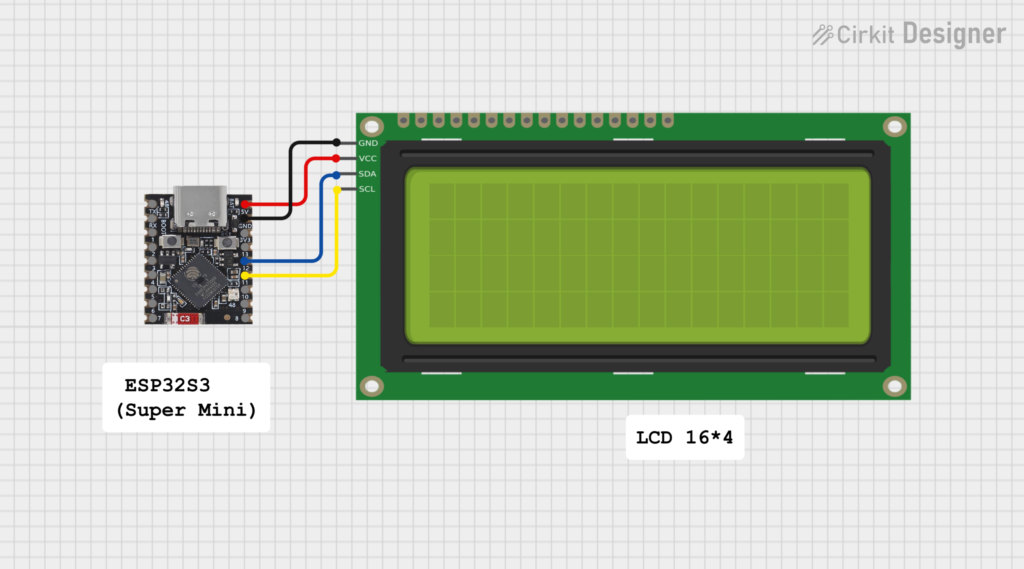
| ESP32-S3 Super Mini | 16×4 I2C LCD |
|---|---|
| 5V / VIN | VCC |
| GND | GND |
| GPIO12 | SDA |
| GPIO11 | SCL |
Connection Diagram
ESP32-S3 Super Mini        16x4 I2C LCD

5V/VIN  ------------------ VCC

GND     ------------------ GND

GPIO12  ------------------ SDA

GPIO11  ------------------ SCL
Installing Required Library
Open Arduino IDE:
Sketch
 → Include Library
 → Manage Libraries
Install:
- LiquidCrystal I2C Library
- Wire Library (built into Arduino IDE)
Arduino Code: ESP32-S3 Super Mini with 16×4 LCD
#include <Wire.h>
#include <LiquidCrystal_I2C.h>

// LCD address and size
LiquidCrystal_I2C lcd(0x27, 16, 4);

void setup()
{
  // ESP32-S3 custom I2C pins
  Wire.begin(12, 11);

  lcd.init();
  lcd.backlight();

  lcd.setCursor(0,0);
  lcd.print("ESP32-S3 Super");

  lcd.setCursor(0,1);
  lcd.print("Mini + LCD 16x4");

  lcd.setCursor(0,2);
  lcd.print("I2C Display Test");

  lcd.setCursor(0,3);
  lcd.print("Hello World!");
}

void loop()
{

}
Code Explanation
Include Libraries
#include <Wire.h>
#include <LiquidCrystal_I2C.h>
The Wire library enables I2C communication, while LiquidCrystal_I2C controls the LCD.
LCD Configuration
LiquidCrystal_I2C lcd(0x27,16,4);
- 0x27 = Common I2C LCD address
- 16 = Number of columns
- 4 = Number of rows
I2C Pin Setup
Wire.begin(12,11);
ESP32-S3 uses:
- GPIO12 as SDA
- GPIO11 as SCL
Circuit Diagram
Finding LCD I2C Address
Some LCD modules use:
- 0x27
- 0x3F
If the display does not work, upload an I2C scanner sketch to find the correct address.
Common Problems and Solutions
LCD Shows Nothing
Check:
- LCD contrast adjustment potentiometer
- Correct I2C address
- Proper SDA/SCL wiring
- Power supply
Compilation Error
Make sure:
- Correct ESP32 board is selected
- ESP32 board package is installed
- LiquidCrystal I2C library is installed
Wrong Characters Displayed
Try changing:
lcd(0x27,16,4)
to:
lcd(0x3F,16,4)
Applications
This ESP32-S3 LCD project can be used for:
- Weather station displays
- Temperature monitoring
- Smart home controllers
- Clock projects
- IoT dashboards
- Sensor data displays
- Robotics projects
Conclusion
The combination of the ESP32-S3 Super Mini and 16×4 I2C LCD creates a simple but powerful embedded display system. With only four wires, you can build compact IoT projects with real-time information display.
The ESP32-S3’s processing power, wireless features, and flexible GPIO make it an excellent choice for modern electronics projects.
This ESP32-S3 Super Mini LCD project can be used for:
In this ESP32-S3 Super Mini LCD project, you’ll discover how to leverage the power of modern embedded systems.
With the ESP32-S3 Super Mini LCD project, you are well-equipped to create efficient and innovative solutions.



Leave a Reply
You must be logged in to post a comment.